Now building

References, palette, brief.One place to work.

Studio OS connects your visual research, design system, and project context — so you can focus on the work, not the tooling.

Free while we build · No credit card required

studio-os.app/home
Studio OS
Home
Projects
Inspiration
Flow
Brief
Projects
Acme Rebrand
Lumina App
Nox Identity
N
Nick
Free plan
home
+ New project
Good morning, Nick
What are you working on today?
⌘K
Recent ProjectsView all →
Acme RebrandDiscovery
Lumina AppDesign
Nox IdentityHandoff
Daily InspirationAbstract
97
94
92
89
91
88

One workspace, every creative layer. From raw reference to final handoff — Studio OS holds your entire process so nothing gets lost between tools.

FIG 1.1

Every reference, one place.

Save images, links, and screenshots from anywhere. Auto-tagged by mood, color, and subject — so finding the right reference is instant.

FIG 1.2

Your design system, alive.

Build your palette, type scale, and token library as the project evolves. Export a design-system.md your whole team can use.

FIG 1.3

Brief in seconds.

AI reads your board and generates a structured creative brief — positioning, tone, constraints — so you spend less time writing and more time designing.

FIG 1.4

A feed that gets your taste.

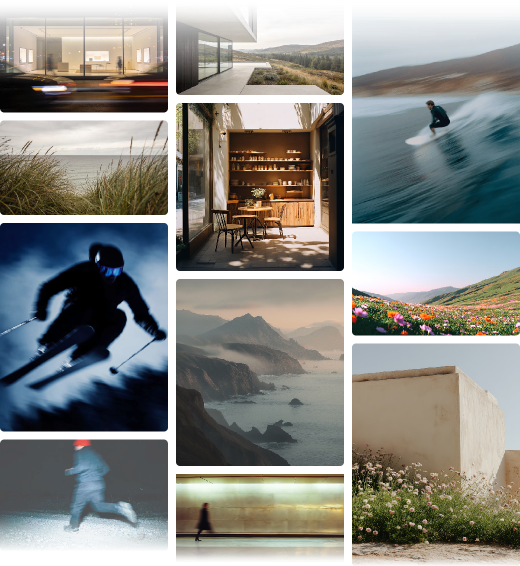
Daily curated images scored by your aesthetic. Connect Are.na channels and Pinterest boards to make it entirely yours.

2.0 — How it works

From first reference
to final spec.

01

Import

Pull references from Pinterest, Are.na, Lummi, or your desktop. Studio OS scores every image on composition, colour, and mood — and organises them without a single manual tag.

Pinterest84
synced
Are.na47
synced
Lummi29
synced
+ Drop files here
02

Systemise

Define your palette, type scale, and spacing tokens inside the project. Everything stays in sync and exports a structured file any AI model or handoff tool can read.

Color
Typography
Aa
Inter Variable · 590
14 tokens definedExport ↓
03

Export

Generate a creative brief in seconds. Ship a design-system.md to your AI tools, or hand off a polished spec to clients and engineers.

ProjectAcme Rebrand
ToneMinimal, premium
PaletteNavy + white
design-system.mdAI-ready
creative-brief.pdfClient
3.0 — Feature overview

Everything your creative
process actually needs.

From first reference to final handoff — Studio OS connects the parts of your workflow that were never meant to live in separate tabs.

4.1

Every reference, one place.

Drag in images from anywhere — Pinterest boards, Are.na channels, Lummi, or your local files. Studio OS organizes and scores them automatically so the best stuff surfaces first.

PinterestAre.naLummiLocal files
FIG 4.1
Acme Rebrand / References
sort: score
Brand film
94
Editorial
92
Product
90
Identity
88
Spatial
86
Motion
84
247
Images
4
Sources
191
Tagged
4 sources
natively connected
1 export
works with any AI tool
∞ projects
no workspace limit
4.0 — AI curation

Only exceptional
imagery makes the cut.

Every image is evaluated on composition, color theory, and emotional resonance. Only images scoring 80+ reach your feed — so you never wade through noise.

Composition
Balance & structure
92
Color
Palette & harmony
88
Mood
Emotional impact
85

Min. threshold: 80 · Refreshed daily · Learns from your saves

Canvas — Moodboard upload
97
Canvas — Moodboard upload
Vision — Reference board
92
Vision — Reference board
Canvas — Design system tokens
95
Canvas — Design system tokens
Project Rooms
88
Project Rooms
Canvas — Dark mode
94
Canvas — Dark mode
Type Library — Font browser
91
Type Library — Font browser
Canvas — Component generator
96
Canvas — Component generator
Home — Command bar
89
Home — Command bar

Free while we build.
No card. No expiry.

Free is genuinely useful. Pro pays for itself the first time you hand off a project.

Free

Free
Free for everyone
  • 5 projects
  • Unlimited reference saves
  • Board, Type, Palette, Tasks, Brief
  • ⌘K command palette
  • Daily inspiration (curated feed)

Pro

US$9per month
  • Unlimited projects
  • AI auto-tagging on every reference
  • GPT-4 scored inspiration feed
  • Export design-system.md
  • Are.na + Pinterest import
  • Browser extension (coming soon)

Questions? hello@studio-os.app

Questions worth asking.

Still wondering about something? Just ask us.

Studio OS is a single workspace for your entire creative process — moodboard, design system, and project brief all in one place. It's the connective layer between your inspiration and your output. Not another tool to learn, but the one place where your creative thinking lives before it becomes design.

Early access

Stop managing moodboards.
Start building.

Studio OS brings your references, design tokens, and briefs into one workspace — scored, organised, and AI-ready from day one.

designers on the waitlist